
Anamorphosis was intended to be a short but moderately challenging series of puzzles that were hopefully satisfying to solve. Wordplay, ciphers, and intricately-designed metas are unfortunately not my forte, so I stuck to my one-trick specialty: techslop, as one solver had gracefully put it.
As I anticipated, a decent number of people were not very comfortable with some technical aspects of the weekly. Perhaps it was truly techslop after all.
Well in the end, none of the puzzles broke (to my knowledge), so I think I did pretty decent for a first submission. Anyway — enough waffling, let's go!
This level is intended to take advantage of a common misconception that webpages are static entities. In reality, webpages can change dynamically based on a variety of factors, including time, user interactions, and even external data sources. The hint "Something is changing" is a clue to look for dynamic elements on the page that may reveal hidden information or lead to the solution.
If you look very closely (it helps to zoom in), you will notice that the bullet points on the page are either solid circles or squares.
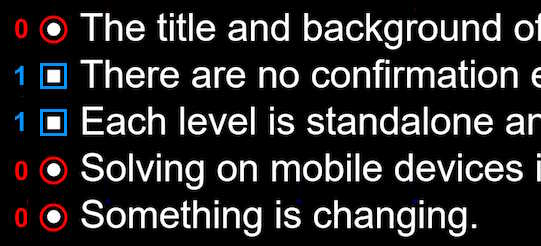
Refreshing the page will cause these shapes to change — there are 7 sets of 5 bullets before the pattern loops around. For each set, treat each circle as 0 and each square as 1, then convert from 5-bit binary to decimal. Reading the numbers as A1Z26 gives the word "KALEIDO".
Answer: kaleido.php
This level contains what appears to be an image with its data manipulated. Alas, for my fellow Firefox enthusiasts, the browser's built-in image viewer is not capable of rendering this image correctly. It does at least manage to be somewhat visible on Chrome.
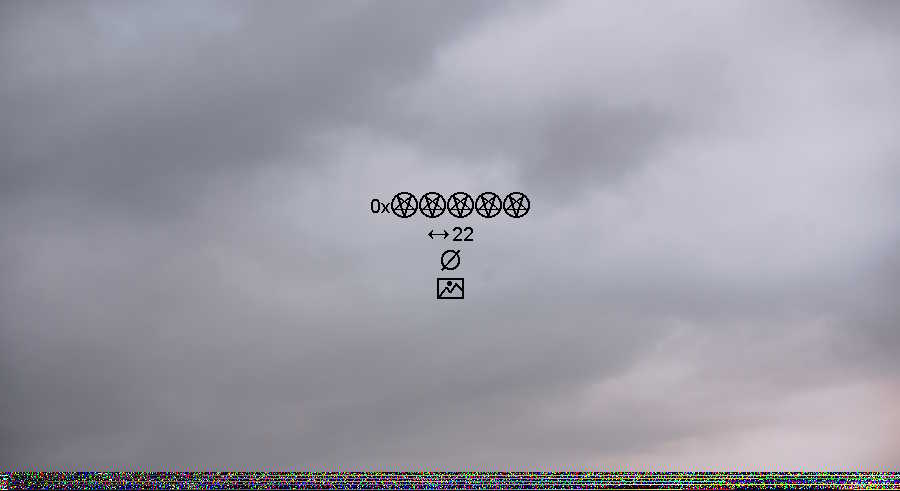
The first step is to open the image in a hex editor. My personal recommendation for this case is HexEd.it, for reasons mentioned later. Afterwards, either by using a goto command or simply scrolling down, navigate to the byte offset 0x66666. This is hinted by the first line of text in the image, which references 666 (the number of the beast).
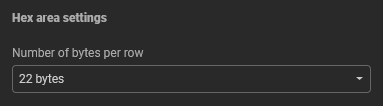
At this point, there is still no visible result. Follow the next line of text in the image, which instructs you to set the row width (i.e., number of bytes displayed per line) in your hex editor to 22.
The following hint is the null symbol. Look closely in the hex editor - the negative space formed by the null bytes can be read as English letters. The final line is an "image" icon indicating that you are meant to read the ASCII view as a picture.
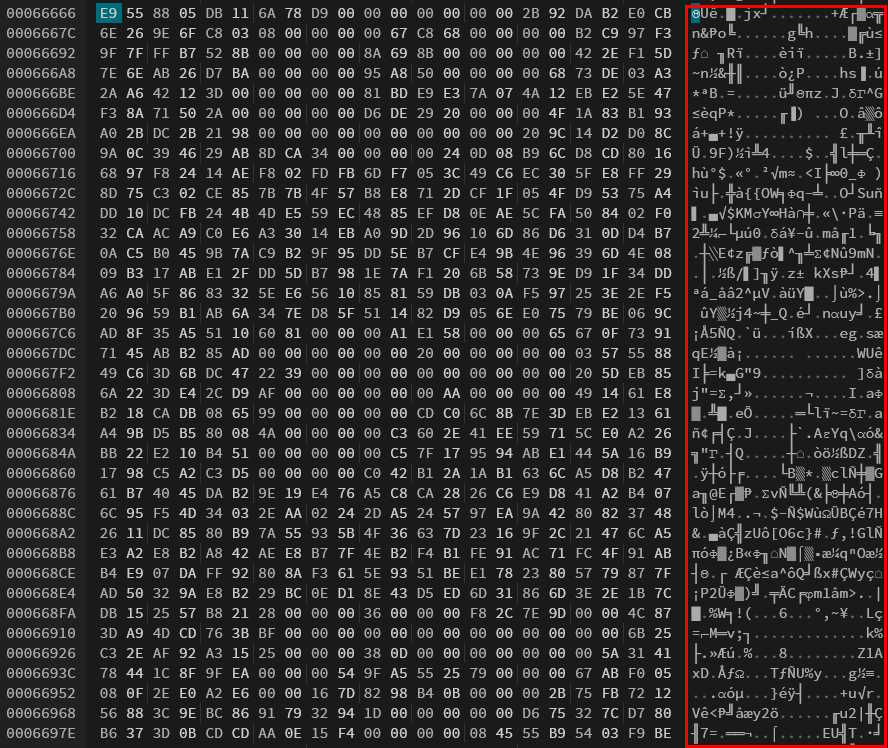
The end result is 7 characters which spell out the word "cr7ptid". I recommend HexEd.it for this level because unprintable characters are rendered in a slightly different colour, making it easier to distinguish them from the printable characters.
Interestingly enough, other solvers managed to use another method. Extracting the image data at 0x66666, saving it as a separate file, and then importing it into an image editor (e.g., GIMP) with specific settings also provides a similar result.
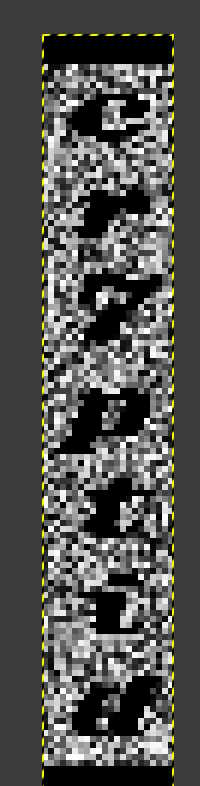
Answer: cr7ptid.php
The most conspicuous element of the level image is clearly the censor bar that is covering some text on a sign.
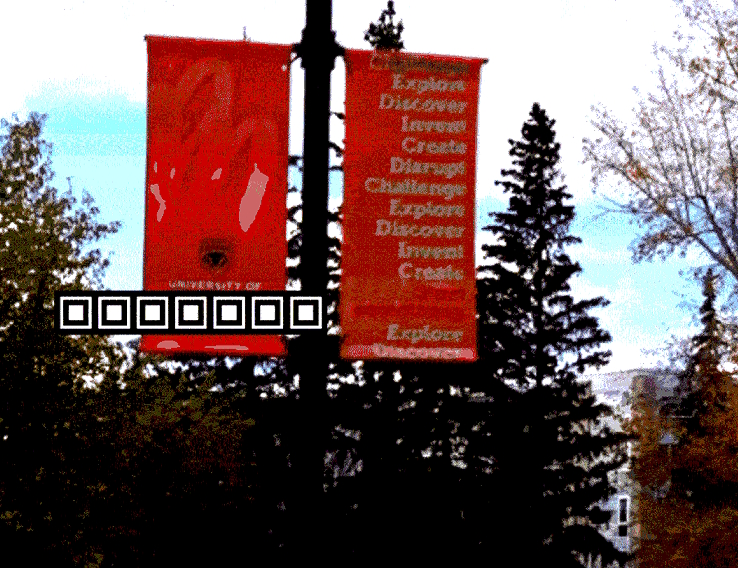
Standard internet sleuthery (e.g., reverse image search, googling the text on the adjacent sign) reveals that the sign says "University of Calgary". With that, we have obtained the information we need from this state, so let's find the second.
Looking at the page source, the <img> tag for the image has an alt attribute of "s/i/1/". This is sed syntax for text substitution which tells you to replace the "i" in the filename with a "1", which will lead you to the second image (p1c.gif).
The text in the second image contains clues which refer to some specific object, so let us break it down:
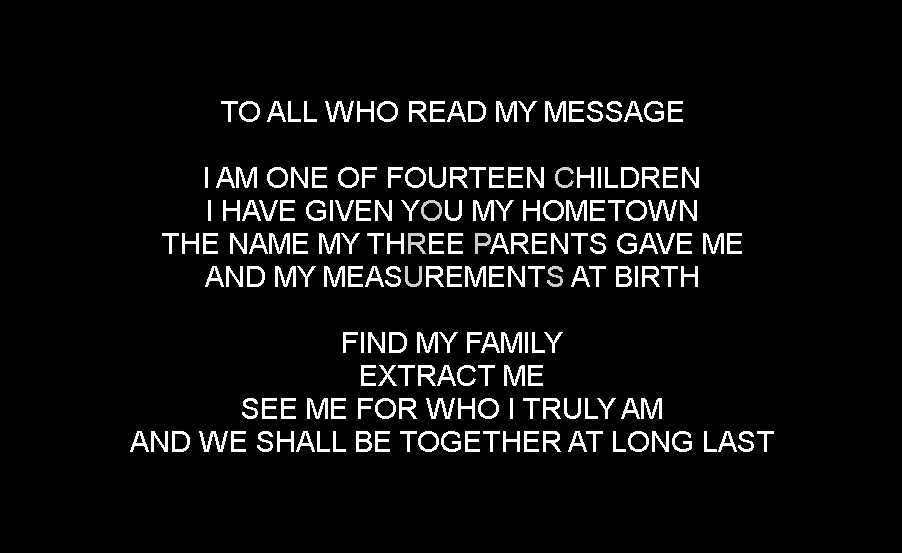
Putting these clues together and doing some googling will lead to the Calgary corpus, a set of 14 files ("fourteen children") commonly used for testing data compression algorithms. Among these files is one named "pic", which matches the clues given in the image. The corpus does indeed have "three parents": Ian Witten, Tim Bell, and John Cleary, who created it in the 1980s.
Download the corpus from any reliable research website and extract the "pic" file. Unfortunately, the file does not have a standard image format header, so it cannot be opened directly. In fact, it is a binary image, consisting of only 1s and 0s corresponding to black and white pixels respectively. I recommend using dCode's specialised tool to convert the data to a viewable image. Opening the result shows that it is a high-definition scan of a random page from a French research paper.
Finally, look at the second GIF state again. Every few seconds, another frame flashes for an instant, showing a mysterious eye hiding behind the text as well as numerous arrows pointing outwards.
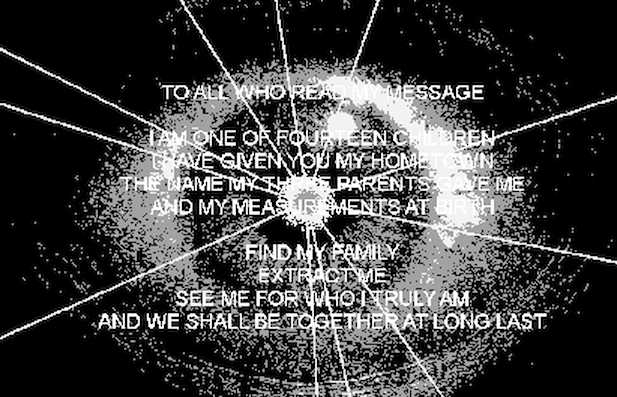
Extract this frame and overlay it over the decoded "pic". You will observe that each arrow actually points to a specific letter on the scanned page. Collecting the letters in reading order (down the first column, then down the second) spells out the phrase "DONT LEAVE ME".
Answer: dontleaveme.php
The challenge with this level lies with identifying what the underlying mechanic actually is. Looking at the image closely, you can see that it is vertically partitioned into 5 equal sections, with some sections being slightly discoloured. The 5 squares in the centre of the image also indicate a keyword which is 5 letters long.
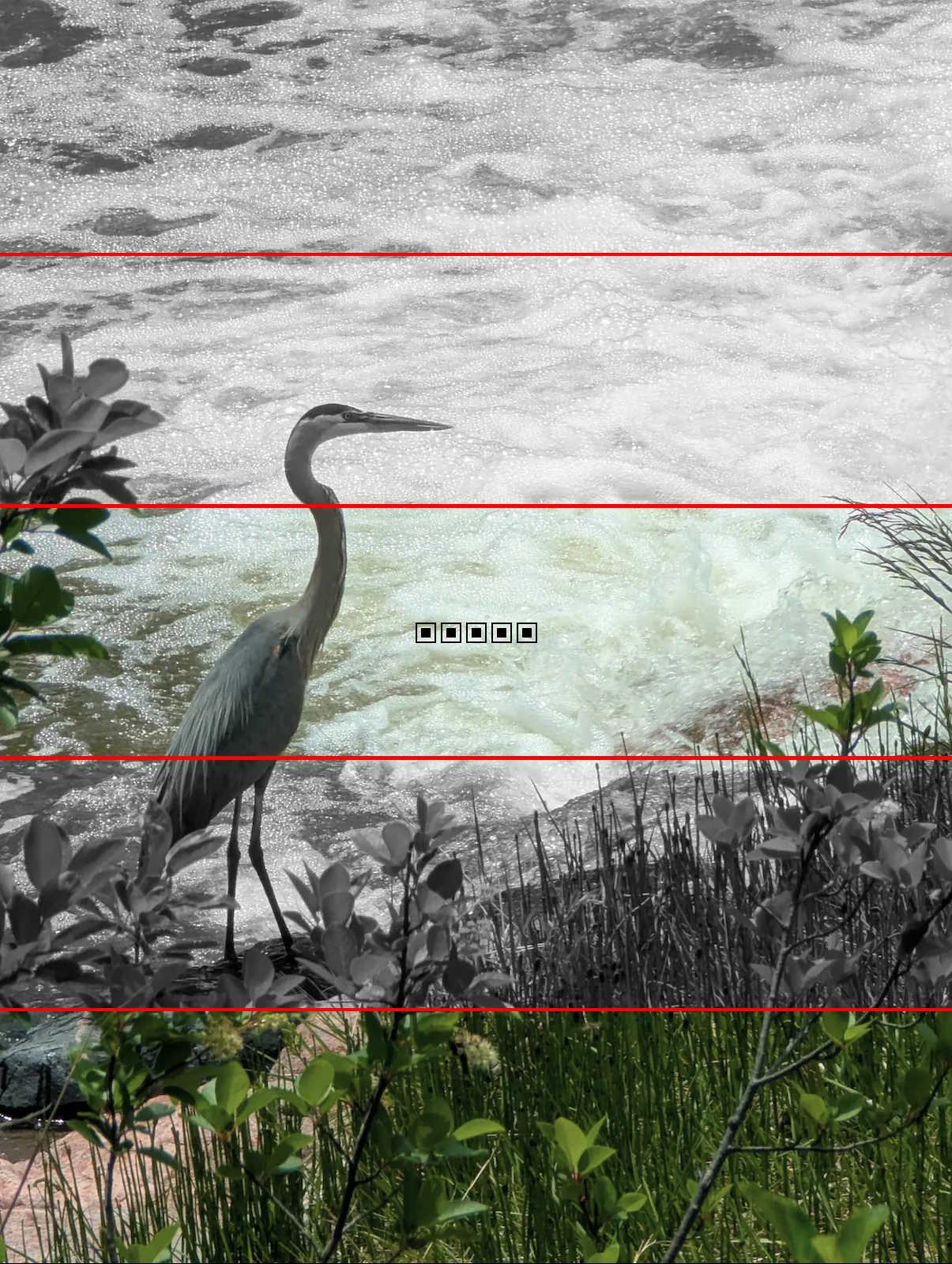
An astute solver may note that the concepts of "5-letter words" and "crane" bring to mind the popular game Wordle, where players guess a hidden 5-letter word. In Wordle, letters that are in the correct position are highlighted in green, while letters that are in the word but in the wrong position are highlighted in yellow.
Alternatively, this level also addresses another line of thinking to help you reach this conclusion. Doing a reverse image search reveals that the bird in the photo isn't really a crane but rather a great blue heron. Changing the image to heron.webp shows some additional text.

The mechanic behind this level is that you are playing Wordle by changing the image filename to a 5-letter word. Each time you do so, the image updates to reflect your guess, with the 5 sections indicating which letters are correct (element is present), present but misplaced (element is half-visible), or absent (element is missing). Starting from the top of the image, the first section corresponds to the first letter, the second section corresponds to the second letter, and so on. Note that the image only renders if the filename is a valid Wordle guess.
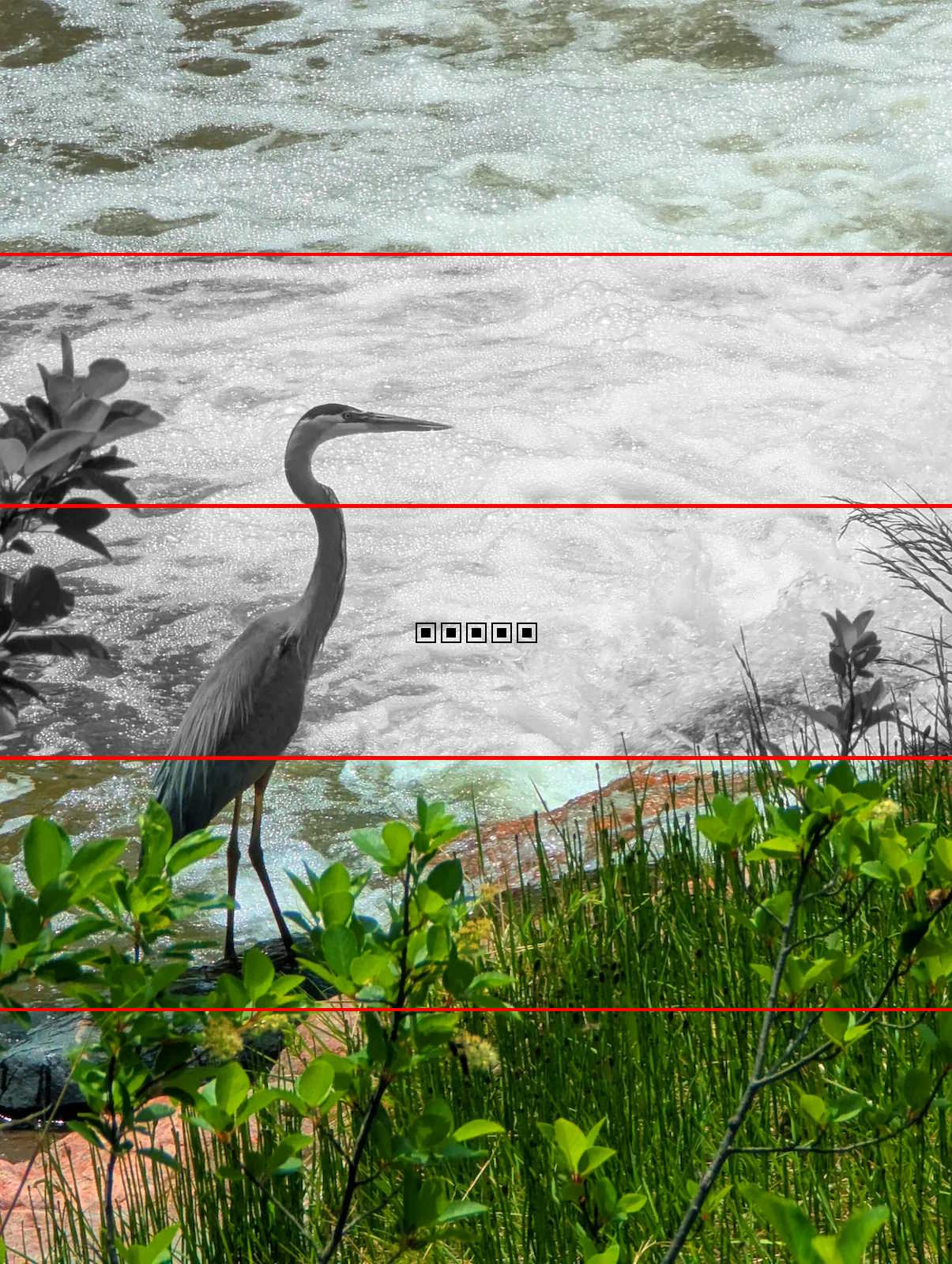
For each letter, the corresponding image segment will be coloured as follows:
Trial and error will eventually lead to the answer: "DAZED", with the corresponding image "dazed.webp" containing all 5 fully-saturated elements. This image leads you to the next page.

Answer: greywoman.php
This level is slightly more technical than the rest and involves knowledge about lossy JPEG compression.
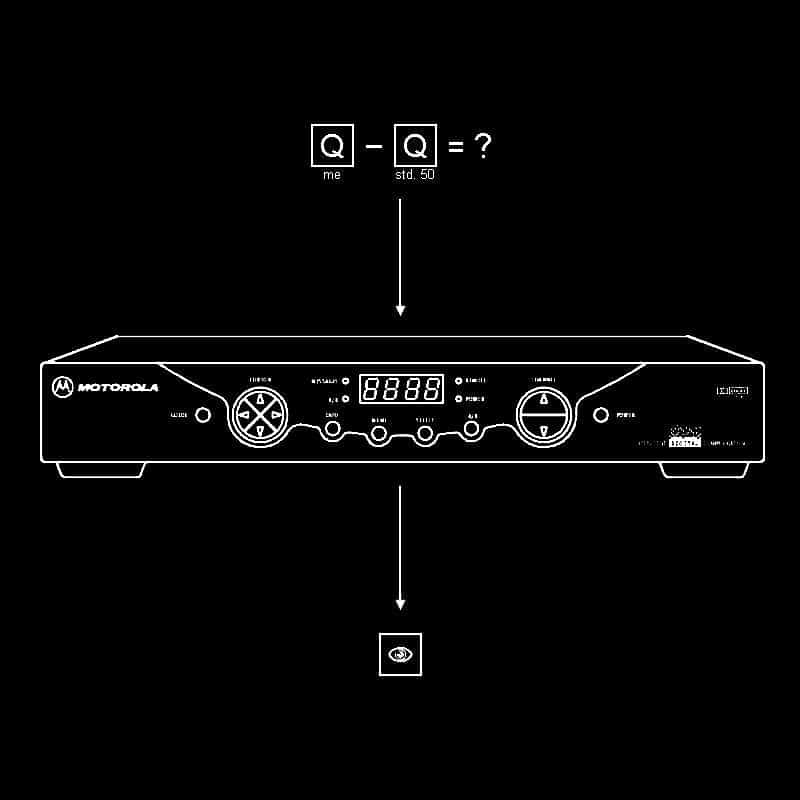
The first step involves the 8x8 quantisation table (Q) used in JPEG compression. The table used for the level image can be extracted from the DQT segment at the start of the file data using a hex editor. Alternatively, an online tool such as jpdump extracts the file's image headers, which include the DQT segment.
Note that the string of 64 bytes from the DQT is read in a diagonal zig-zag fashion, beginning from the top-left corner, to reconstruct the 8x8 table.
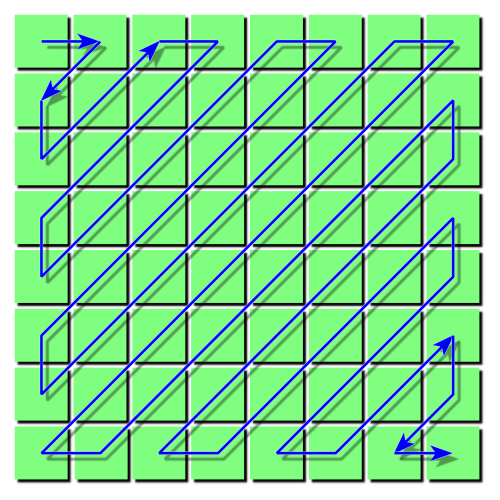
For the level image specifically, these bytes, when converted to decimal, are:
16 11 12 14 12 10 16 20 18 14 18 24 39 23 24 40 27 24 22 30 24 49 35 37 29 40 58 51 61 60 57 51 56 55 64 72 92 78 64 68 87 69 55 56 80 109 81 87 95 98 103 104 103 62 77 113 121 112 100 120 92 101 103 99
Reconstructing the 8x8 quantisation table from this (using zig-zag order) gives:
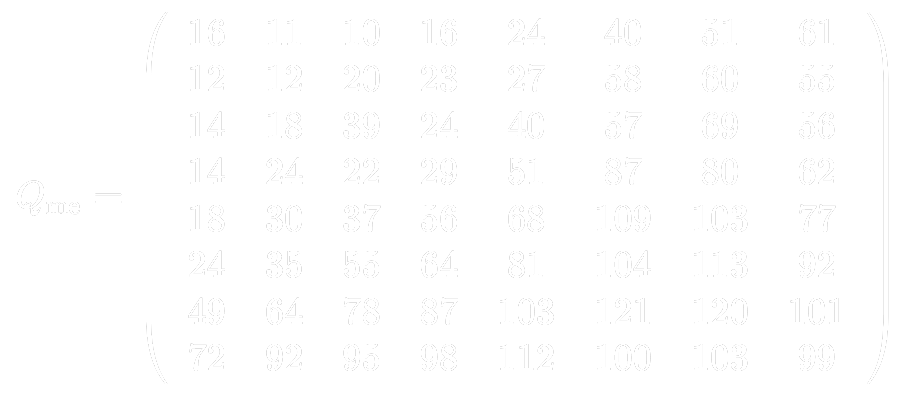
Many solvers were able to extract the quantisation table data but did not apply the zigzag rearrangement, resulting in an incorrect subtraction result. One common consequence of this was people attempting to use the garbled result as DCT coefficients, resulting in a useless 8x8 image. We can only direct our shared spite towards the programmers of an older era who were too efficient at their jobs when designing the JPEG specification.
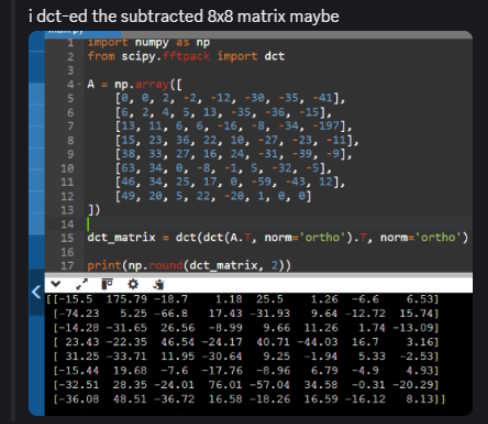
Next, acquire the "base Q", which is the standard quantisation table for 50% quality from the original JPEG standard. You can find this by googling online; it's also included in the Wikipedia articles for JPEGs and quantisation.
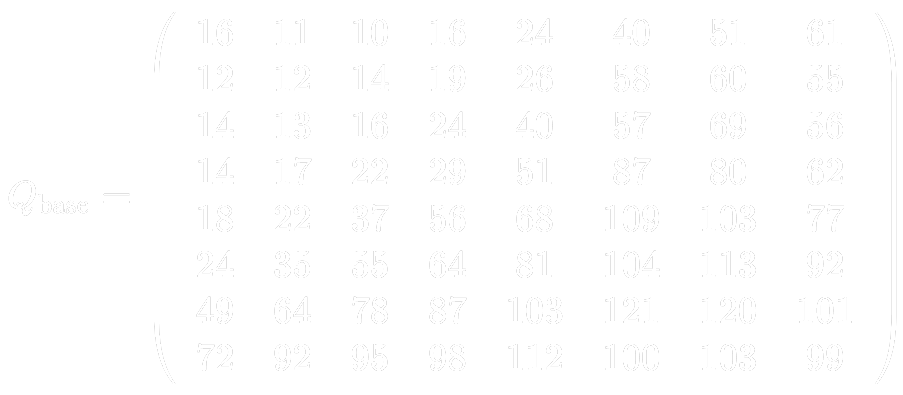
By examining both tables, you may note that they are almost identical, except for a few entries. Take the difference between the matrices to isolate 7 numbers in certain positions:
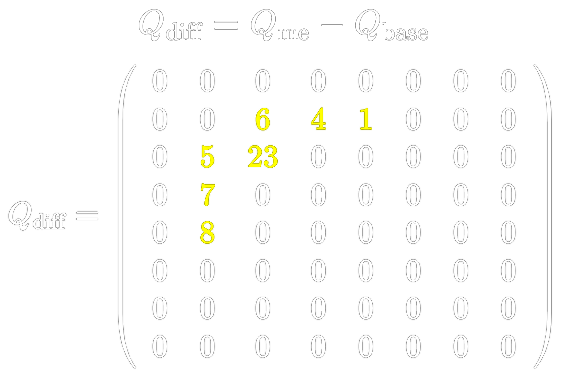
Moving on to the next part of the level image, note the illustration in the middle. Doing a reverse image search will lead to the Motorola DCT2000. This is actually a reference to the type-II discrete cosine transform (DCT) used in JPEG compression. More specifically, it relates to the 8x8 grid of 64 patterns formed by the basis functions of the DCT.
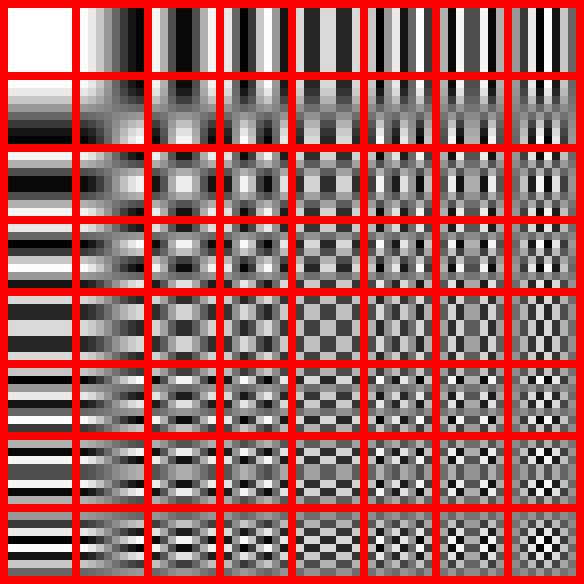
Extracting the patterns in the same positions as the 7 numbers obtained earlier, and reading in ascending order of the numbers (the pattern for "23" is used 2nd and 3rd), the result is:

Finally, reading these patterns as letters (use your eyes, as indicated by the bottom hint in the image) gives the word "MOONCASE".
Answer: mooncase.php
This page displays the weekly solution, which is "anyonecanfindloveexceptus".
The general theme of this weekly was "one image of a different filetype for every level". Style and aesthetic were loosely inspired by several defunct /x/ ARGs from the 2010s, a couple of "laincore" websites, and also trijomor (because who doesn't love trijomor).
Thanks for playing! Hope you had fun.
− A4